3D打印机对标图(Benchmarking Map)(ZT)

3D打印机对标图(Benchmarking Map)
现在市面上已经出来层出不穷的个人3D打印机,有的是爱好者自制的,有的是专业大公司推出的,还有像Makerbot,Form 1等专业团队开发的设备。那么它们各自在市场上占据什么位置呢,看了这幅图你就会有个粗略的概念了。另外,这幅图还包括了3D设计建模软件以及3D扫描套件的对标。有了这幅图,用户们可以根据自己的需求选取相应的设备方案。
Permalink Comments off
现在市面上已经出来层出不穷的个人3D打印机,有的是爱好者自制的,有的是专业大公司推出的,还有像Makerbot,Form 1等专业团队开发的设备。那么它们各自在市场上占据什么位置呢,看了这幅图你就会有个粗略的概念了。另外,这幅图还包括了3D设计建模软件以及3D扫描套件的对标。有了这幅图,用户们可以根据自己的需求选取相应的设备方案。
Permalink Comments off
By Brian Heater posted Jan 29th, 2013 at 2:00 PM0

CES 2013 proved to be something of a coming out party for consumer-facing 3D printers. Sure MakerBot earned a fair amount of attention at last year’s show with the announcement of the Replicator, which snagged its share of awards from various press outlets. This year, however, saw a relative deluge in 3D-printing representation, with strong showings from 3D Systems, FormLabs, MakerBot and the cloud-based 3D printer, Sculpteo. Even with so many companies rising to prominence, the dream of truly mainstream 3D printing still feels a ways off — if that is indeed where we’re inevitably heading.
These nascent days are an exciting time, with a diverse array of companies and organizations vying to be the first to bring the technology to our homes. In a sense, many roads lead back to RepRap, the open-source, community-fueled project aimed at creating a self-replicating machine. As such, the same basic technology underlies many of these devices. At their core, these 3D printers are not unlike their 2D counterparts, offering a way to translate images on computer screens into real-world analogs — only in this case they’re objects you can hold in your hand.
Most of these work by melting plastic (largely Lego-like ABS or biodegradable PLA) and squirting it out through extruder heads. The heads operate along the X and Y axes, while the build platform (generally heated in the case of ABS and unheated for PLA) moves downward, allowing the glue gun-like extruders to build up the thin layers of plastic. Some printers rely on other technologies, many of which are rooted in the world of rapid prototyping, a category of fabrication that has been around for decades and used by companies like Boeing and Ford to created scale models of concepts.
There are a surprising number of companies and organizations currently invested in the space, be it through pre-fabricated models, kits or open-source, downloadable plans. We pulled together a list of some of the most prominent, which you can check out after the break.

The Machine: CubeX
The Price: $2,499 to $3,999
The Features: Up to three colors, up to 10.8 x 10.45 x 9.5-inch build volume, up to 125-micron resolution, touchscreen interface
3D Systems has been in the 3D-printing game since before the term was coined. The company’s CTO, Chuck Hull, invented stereolithography back in the early ’80s. Hull helped co-found the company in 1986 and it has since become one of the dominant forces in the world of industrial rapid prototyping (we saw some of those devices in action when we visited Laika Studios during the production ofParaNorman). Last year, the company released the portable Cube printer, an officially branded entry in the consumer space (which coincided with the end of the consumer-facing Botmill line it also owned). At CES this year, 3D Systems offered up a one-two punch, with the release of a faster version of the Cube and themassive CubeX. The latter can do three-color prints and create objects up to 1,070 cubic inches — or as the company puts it, “as big as a basketball.” The CubeX can use either PLA or ABS and runs you $2,499.

The Machine: 3DTouch
The Price: $3,490 to $4,370
The Features: Up to three extruders, 10.8 x 10.8 x 8-inch build volume (for single extruder model), up to 125-micron resolution.
Another member of the ever-expanding 3D Systems family, Bits from Bytes was acquired by the company in late 2010. It was founded in 2008 by Ian Adkins with the noble mission statement of “democratizing 3D printing for everyone.” Like so many others in the field, BFB’s models are based on the pioneering work of the open-source RepRap Project. On the low-end, the company offers a fairly barebones kit, primarily aimed at education (it sort of looks like something built with a Capsela set), which starts at $1,390 and runs up to $2,170. The more polished 3DTouch features a touchscreen and, on the high-end, three extruder heads — a luxury that costs $4,370

The Machine: Eventorbot
The Price: Assembled unit price TBD, $885 pledge on Kickstarter (now closed)
The Features: Low cost, streamlined at-home assembly, 10 x 8 x 6-inch build volume.
This Kickstarter-backed project is the brainchild of Illinois-based Duy Dang, who claims it’s “the perfect beginner 3D printer,” thanks to its low build cost and the relatively few parts required to assemble it. At its center is a single square tube that hides most of the wires. As with the open-source RepRap, many of the Eventorbot’s parts can be printed on the device itself, making it possible to continually upgrade the device

The Machine: DeltaMaker
The Price: Assembled unit price TBD, $499 to $1,099 pledge on Kickstarter
The Features: Delta robot platform, 9-inch diameter x 11-inch build volume, 100 micron resolution
“Why should a 3D printer look like a microwave oven?” DeltaMaker’s not the first 3D printing company to ask the question (in so many words), nor is it the first to adopt this form factor. Still, we won’t begrudge anyone looking to break out of the classic 3D printer style, and certainly anything that makes the experience if watching the act all the more interesting is worth a look. The Florida-based team is around half the way to its $100,000 goal, promising a printer with a 9-inch diameter x 11-inch high build volume and a 100 micron resolution.

The Machine: Delta Micro Up! Plus / Afinia H-Series
The Price: $1,500
The Features: Prints in ABS / PLA, 5.5 x 5.5 x 5.3-inch build volume, 150-micron resolution
This Beijing-based company has taken to calling its products “micro factories.” Delta Micro offers a couple of devices, including the $900 Up! Mini. At the high-end is the $1,500 Up! Plus [pictured], which, at least from an aesthetic standpoint, is the picture of minimalist simplicity. It has a build volume of 5.5 x 5.5 x 5.3 inches and can print in both PLA and ABS plastic. The latter is available in the US under the Delta Micro name or, with the Afinia branding, carrying the H-Series name (under which it took home a “Best Overall Experience” award from Make Magazine).

The Machine: Fab@Home Model 2
The Price: N/A
The Features: Streamlined building process compared to Model 1, printing in any number of materials: including frosting, clay and rubber caulk
More of an ongoing, open-source collaborative project than a company, Fab@Homewas born out of Cornell’s Computational Synthesis Laboratory (now the Creative Machines Lab) way back in 2006 in order to build a machine that can “make real objects.” The result is a device that can print in an astonishing number of materials, including frosting, rubber caulk, ceramic clay, chocolate and ice. The Cornell team has most recently unveiled the Model 2, which offers improvements to the hardware and software as well as cheaper, easier builds and lower skill-level demands. Fab@Home doesn’t actually sell the printers, but there are ways of getting your hands on one, if you email the right people.

The Machine: Filabot
The Price: TBD, $490 pledge on Kickstarter (now closed)
The Features: Not a 3D printer per se, rather a device that recycles plastic into filaments for prints
The Filabot’s not a 3D printer, but it’s certainly worth mentioning in a roundup like this. The crowdfunded device aims to address one of the fundamental concerns of consumer 3D printing: waste. The machine (awarded to investors who pledged $490 or more) grinds, melts and extrudes recyclable plastic into a 1.75 or 3mm spool that can be used with at-home 3D printers. Filabot will work with a number of plastics, including ABS, HDPE and nylon (the company is in the process of testing a number of others, including PLA).

The Machine: Form 1
The Price: $3,300
The Features: Utilizes stereolithography printing for more precise prints, 4.9 x 4.9 x 6.5-inch build volume
The grad students at the MIT Media Lab shared the dream of bringing the professional quality of their school’s rapid prototyping machines to consumers.Formlabs realized that goal by eschewing the plastic extrusion technology found in most hobbyist devices for the far more precise stereolithography wherein a tray of liquid resin hardens when exposed to a laser, until the desired object is fully formed. The process is quieter than much of the competition and the resulting prints achieve a level of detail that blows away what we’ve seen even the most high-resolution consumer printers accomplish. Co-founder Maxim Lobovsky showed us a highly impressive Eiffel Tower print. At $3,300, the Form 1 isn’t the cheapest consumer-facing printer around, but given the quality it’s capable of printing, it’s a downright steal.

The Machine: Creatr
The Price: $1,683 (single extruder), $2020 (dual-extruder)
The Features: ABS, PLA and PVA printing, aluminum body, 9 x 10.6 x 8.7-inch build volume, 200 micron printing
The Creatr certainly looks the part of a semi-pro printer, but with a starting price of €1,250 ($1,683), the aluminum-encased the device clearly has consumers in mind. The tree frog-emblazoned box has a build volume of 9 x 10.6 x 8.7-inches, can print in ABS, PLA and PVA and comes with one or two extruders. Leapfrog, which was formed last year, also offers the Xeed, which carries a far pricier €5,460 ($7,353) price tag, has a tablet interface built in, to help you nab your models without the use of a computer.

The Machine: AO-101
The Price: $1,725
The Features: Rugged build quality, 7.9 x 7.5 x 3.9-inch build volume, 200-micron resolution
If you can get around the meme-centric name for a moment, you’ll find that LulzBot is a fairly serious company with some straightforward goals. As with so many others, this Aleph Objects brand took inspiration from the open-source RepRap project — in fact, the company produces hardware, tools and electronics with RepRap makers in mind. Those less interested in the construction part of the process, however, can pick up a prefab AO-101 printer from the company for $1,725. LulzBot calls the AO “the workhorse of the 3D-printing industry,” thanks to its rugged design. The testing process for the printer reportedly involved standing on it, making it print upside down and printing while strapped to the back of a truck driving down dirt roads. If you’re looking for a consumer 3D printer to bring on your next space flight, this might be the ‘bot you’re looking for.

The Machine: Replicator 2x
The Price: $2,800
The Features: Easy-to-load extruder, two extruders, 9.7 x 6 x 6.1-inch build volume, 100-micron resolution
In terms of sheer exposure, MakerBot is the company to beat. Founded in 2009, the Brooklyn-based organization currently seems best positioned to help consumer 3D printing go mainstream. As with so many others, MakerBot’s roots are firmly planted in the RepRap scene, with co-founder Zach Smith having been heavily involved with the project. In spite of those roots, there’s little doubt that MakerBot is a firmly commercial venture. It’s even found itself mired in some controversy after appearing to turn away from the open-source community with the release of the Replicator 2, causing Smith, among others, to critique the company’s business model.
MakerBot made a splash at last year’s CES with the announcement of the first-generation Replicator, which featured an increased build volume (8.9 x 5.7 x 5.9 inches) and dual-extrusion (two-colors). This year, the company showed off its recently released Replicator 2 and the new 2X, the latter of which features dual-extrusion and a heated build platform, optimized for ABS plastic. Both of the second-generation Replicators also feature a number of tweaks to their predecessors’ body, including further increased build volume (11.2 x 6.1 x 6.0 inches for the Replicator 2) and the ditching of the more DIY-looking wooden aesthetic. The 2 and 2x run $2,199 and $2,799, respectively.

The Machine: M2
The Price: $1,750 (assembled)
The Features: 8 x 10 x 8-inch build area
Rick Pollack founded MakerGear in order to supply home fabricators with the necessary tools, after attempting and failing to prototype a product of his own at home. Fittingly, the site is a resource for all sorts of 3D printer bits and pieces, like platforms, motors and extruders. The company started life in 2009, creating extruders for MakerBot Cupcake printers, “because the MK4 extruder was not reliable and caused endless problems and frustration for users,” as Pollack tells us. The shipment of those extruders lead other industrious folks, including RepRap community members, to start utilizing the service. The company also offers the plans for a number of kits, including the M1 (Mosaic), M2 [pictured] and Prusa Mendel.

The Machine: Metamáquina 2
The Price: $1,614
The Features: 7.9 x 7.9 x 6-inch build volume, 200-micron resolution
A company inspired by the open-source community that has given rise to so many 3D-printing companies, Metamáquina developed out of the Garoa Hacker Clube, the first hackerspace in Brazil, where its founders Felipe Sanches and Rodrigo Rodrigues da Silva started hacking a MakerBot printer. Now the company is prepping the release of its second-generation device, set to ship this April. The Metamáquina 2 features a build volume of 7.9 x 7.9 x 6 inches — more than double that of its similarly named predecessor. It will run R$3,300 ($1,614) when it hits in a couple of months.

The Machine: Printrbot GO
The Price: $1,500 (unassembled kit)
The Features: Portability (folds up into a briefcase), battery-powered, 7.9 x 7.2 x 5.9-inch build volume
Here’s yet another in the long line of consumer-facing 3D printers brought into the world with a little Kickstarter love — well, more than a little. Printrbot creator Brook Drumm managed to raise a staggering $830,000-plus after setting a $25,000 goal. The company designed the device “to be the simplest 3D printer yet.” A small kit can be assembled relatively quickly by beginners — a sort of IKEA-esque approach to the world of 3D printing, if you will. The company also has affordability in mind, with the low-end, foldable Printrbot Jr. running an astonishingly low $399. That price helped the foldable device snag a “Best Value” from our friends over at Make Magazine late last year. The company’s line tops out at $1,500 for the moment, which will get you a Printrbot GO [pictured], a portable 3D printer that fits in a briefcase for the traveling maker. That one was created with help from Ben Heck, of course.

The Machine: Pwdr
The Price: $1,330 (estimated assembly price)
The Features: Powder-based printing, refillable cartridges
Another attempt to bring pro-level 3D printing to the home hobbyist, Pwdr uses powder-based rapid prototyping, rather than the plastic extrusion at the center of most commercial entries in the space. Developed though the University of Twente in the Netherlands, the vowel-hating hardware is currently in its early stages (Model 0.1), but the open-source plans are currently available online for early hackdopters. According to the site, building one of these should run you around €1,000 ($1,330).

The Machine: RepRapPro Huxley
The Price: $599 (unassembled kit)
The Features: The open-source original, 5.5 x 5.5 x 4.3-inch build volume, more portable than other RepRap devices
The project that launched a million 3D printers, RepRap (that’s short for replicating rapid prototyper) began with the fairly noble, awesome and vaguely terrifying intention of developing a self-replicating machine. Spearheaded by Dr. Adrian Bowyer, a University of Bath mechanical engineering lecturer, the open-source, non-profit project has given birth to a number of 3D printing machines, including, most recently, Huxley, named for biologist Thomas Henry Huxley.
Consistent with RepRap’s initial mission statement, Huxley can print a good chunk of itself, as well as its predecessor, Mendel (and vice versa). Zach Smith would use much of the knowledge he gained from the early days of the project to help found MakerBot. In spite of, or perhaps because of, the success of commercial successors, RepRap is still going strong, working toward the goal of complete self-replication and espousing the open-source philosophies on which it was created.

The Machine: RoBo 3D
The Price: “Around” $520
The Features: Low cost, PLA / ABS plastic, 10 x 10 x 8-inch build volume, 100-micron resolution
Yet another Kickstarter success story — and a fairly healthy one at that; San Diego-based RoBo 3D has achieved more than eight times its $49,000 Kickstarter goal with about a week left. Price is the big selling point here — at around $520 for an assembled printer, it’s expected to sell for a fraction of the competition. The open-source RoBo 3D has a build volume of 10 x 10 x 8 inches and prints in PLA (though a $99 bump in price will get you ABS). Keep in mind, these aren’t actually shipping yet — the company expects them to go out in March.

The Machine: M.O.B.
The Price: $960
The Features: Metal body, 8 x 6.3 x 6.2-inch build volume
Yet another RepRap-inspired company, Romscraj describes itself as “a little shop set in the mostly sunny little red dot known as Singapore.” The company currently has three models available. At the low-end, the unassembled Portabee kit will run $490. The high-end M.O.B. cube [pictured] features a build volume of 8 x 6.3 x 6.2 inches, a heated platform and a metal body. That one runs $960 fully assembled — and, interestingly, ships with a free BeagleBone development board at the moment.

The Machine: Rostock MAX
The Price: $1,000 starting (non-assembled kit)
The Features: 11-inch (diameter) x 13.8-inch (height) build volume, 50-micron resolution
Another 3D-printing company that’s sought a bit of help from the crowdfunding community, SeeMeCNC began life in late 2011 in an attempt to broaden the maker community’s toolkit. The company’s first 3D printer, the H-1, was firmly rooted in the RepRap community, based on its Huxley design. These days, the site offers a number of build-at-home kits, including the $1,000 cylindrical Rostock MAX [pictured], which features a truly impressive advertised 1,300-cubic-inch build volume. The company’s also working on an LCD panel and SD memory card input to let users control printing on the machine itself.

The Machine: Solidoodle 3
The Price: $800
The Features: Low cost, rugged metal case, 8 x 8 x 8-inch build volume, 100-micron resolution
Back in the fall of 2011, former MakerBot COO Sam Cervantes started work on his own desktop 3D printer, with the aim of taking the space to new levels of affordability. The resulting company is Solidoodle. While the name is arguably unfortunate, the product is anything but. By its second iteration, the company gave the world a remarkably low-priced device, at $500, featuring a 6 x 6 x 6-inch build platform and a rugged body that built upon its founder’s engineering past. We recently got our hands on the company’s third-generation printer, which ups the build size to 8 x 8 x 8, a scale that also brings the price up to $800. It’s a sizable increase, but it still comes in well below the industry standard for consumer 3D printers. And just to show he wasn’t joking about the whole rugged thing, Cervantes took a moment to stand on the printer, when the company came by our office, taking the whole concept of standing by a product to new levels.

The Machine: Mega
The Price: $2,539
The Features: Metal case, massive 23.6 x 23.6 x 23.6-inch build volume
This printer’s namesake, UK-based Richard Sum, took to Indiegogo when it came time to fund his labor of love — multiple times, in fact. The printer now comes in three flavors, the original Basic [pictured], Aluminum and Mega (the Aluminum version with an increased build volume), ranging in price from £300 ($476) to £1,600 ($2,539) to start.

The Machine: Glacier Steel
The Price: $2,650 / $3,650
The Features: Steel frame, up to 16 x 16 x 21-inch build platform ($3,650 model), optional dual extrusion ($450 extra)
One of the odder names in an industry full of odd names, The Future is 3-D is also quite likely the only company with an origin directly involving a Jay Leno show. Inspiration arrived when founder Jeff Christiana saw 3D printing in action on Jay Leno’s Garage. From there, Christiana made a jump over to the RepRap community for “months of frustration” that channeled their way into a company that now sells 3D printer parts. It also sells its own printers, like the metal-framed Glacier Steel and the forthcoming Avalanche, which promises to be the company’s largest and most advanced printer yet. That one’s roughly half a year away, however.

The Machine: Series 1
The Price: $1,400
The Features: 9 x 9 x 9-inch build volume, standard resolution as low as 100 microns.
Maintaining the familiar plywood aesthetic, the Series 1 printer offers up a 9 x 9 x 9-inch build volume and standard resolutions as thin as 100 microns, using the standard software. Though its creators add that, with some tweaking, they’ve managed to get it down to an impressive 50 microns. Released by San Francisco-based Type A Machines, the box’ll run you $1,400.

The Machine: Ultimaker
The Price: $2,269
The Features PLA / ABS plastic, 8.3 x 8.3 x 8.1-inch build volume
Yet another 3D-printer maker born out of the RepRap legacy, this Netherlands-based outfit is “committed to making 3D printing better, faster and simpler.” Ultimaker offered up its first product in May 2011. The current iteration ships as a complete kit for €1,194 ($1,594), featuring a nice build volume of 8.3 x 8.3 x 8.1 inches, without taking up too much space on your desktop. Late last year, the company also entered the pre-built game, with fully assembled printers that run €1,699 ($2,269), a price that includes a free roll of PLA plastic.
Permalink Comments off
http://3d-printers.toptenreviews.com/
| Rank | #1 | #2 | #3 | #4 | #5 | #6 | #7 | #8 | #9 | #10 |
|
10-9 Excellent
8-6 Good 5-4 Average 3-2 Poor 1-0 Bad  |
Cubify CubeX | Cubify Cube | LulzBot AO-101 | Afinia H | Replicator 2 | AW3D XL | AW3D V5 | Replicator 2X | Mbot Cube | 3DTouch |
 |
 |
 |
 |
 |
 |
 |
 |
 |
 |
|
| Reviewer Comments |  |
|
|
|
|
|
|
|
|
|
| Lowest Price |  $2,499.00 |
$1,299.00 |
$1,725.00 |
$1,559.00 |
$2,199.00 |
$2,295.00 |
$1,695.00 |
$2,799.00 |
$999.00 |
$3,490.00 |
| Ratings |
9.53
|
8.60
|
8.08
|
7.85
|
7.63
|
7.58
|
7.38
|
7.35
|
7.25
|
7.08
|
|
10
9
8
7
6
5
4
3
2
1
Overall Rating
Printing Features
Printer Design
Included Components
Connectivity
Help & Support
|
||||||||||
| Printing Features | ||||||||||
| Reliability Score (Percent) | 100 | 95 | 90 | 85 | 95 | 95 | 95 | 95 | 95 | 90 |
| Print Quality Score (Percent) | 100 | 90 | 80 | 95 | 90 | 95 | 100 | 99 | 95 | 95 |
| Print Speed (MM per Second) | 15 | 15 | 200 | 30 | 90 | 150 | 150 | 200 | 40 | 15 |
| Printing Time (Minutes) | 120 | 120 | 15 | 60 | 18 | 12 | 12 | 10 | 78 | 120 |
| Number of Printing Materials | 2 | 2 | 5 | 1 | 1 | 5 | 5 | 2 | 2 | 2 |
| Number of Print Modes | 3 | 3 | 1 | 1 | 3 | 1 | 1 | 3 | 1 | 3 |
| Number of Print Heads | 3 | 1 | 1 | 1 | 1 | 1 | 1 | 2 | 2 | 1 |
| Max Build Height (Inches) | 10.75 | 5.5 | 3.9 | 5.5 | 6.1 | 7 | 7.7 | 6.1 | 7.87 | 7.9 |
| Minimum Layer Height (MM) | 0.125 | 0.125 | 0.1 | 0.2 | 0.1 | 0.1 | 0.1 | 0.1 | 0.1 | 0.1 |
| Max Build Length (Inches) | 10.75 | 5.5 | 7.9 | 5.5 | 11.2 | 12 | 8.3 | 9.7 | 7.87 | 10.8 |
| Max Build Depth (Inches) | 9.5 | 5.5 | 7.5 | 5.5 | 6 | 8 | 4.4 | 6 | 7.87 | 10.8 |
| Max Build Volume (Cubic Inches) | 1098 | 166 | 231 | 160 | 410 | 672 | 281 | 355 | 487 | 921 |
| Max Print Layer Thickness (mm) | 0.125 | 0.25 | 0.75 | 0.4 | 0.1 | 0.4 | 0.125 | 0.125 | 0.3 | 0.125 |
| Print Tolerance (MM) | 0.2 | 0.2 | 0.2 | 0.2 | 0.1 | 0.04 | 0.1 | 0.1 | 0.2 | 0.125 |
| Filament Sizes (MM) | 1.75 | 1.75 | 1.75 / 3 | 1.75 | 1.75 | 3 | 3 | 1.75 | 1.75 | 3 |
| Printing Cost (Smartphone case) | $3.80 | $3.80 | $3.84 | $2.40 | $0.22 | $0.08 | $0.08 | $0.09 | $0.90 | $0.16 |
| Filament Cost | $99.00 | $49.00 | $31.99 | $15.00 | $48.00 | $17.75 | $17.75 | $21.81 | $19.09 | $35.90 |
| Printing Jet Material | Plastic | Plastic | Metal | Metal | Metal | Metal | Metal | Steel | Metal | Metal |
| Prints in ABS Plastic | ||||||||||
| Prints in PLA Plastic | ||||||||||
| Printer Cartridge Recycle Program | ||||||||||
| Multicolor Print Capable | ||||||||||
| Heated Platform | ||||||||||
| Printer Design | ||||||||||
| Ease of Use Score (Percent) | 100 | 95 | 90 | 85 | 85 | 90 | 85 | 95 | 90 | 90 |
| Number of Printer Housing Colors | 1 | 5 | 1 | 1 | 9 | 9 | 9 | 1 | 1 | 3 |
| Printer Weight (Pounds) | 84 | 9.5 | 18 | 11 | 18 | 18 | 18 | 28 | 35 | 84 |
| Printer Length (Inches) | 20.3 | 10 | 18.3 | 9.6 | 16 | 13.5 | 16 | 19.1 | 16 | 23.6 |
| Printer Height (Inches) | 23.5 | 13 | 19 | 13.8 | 19 | 13.5 | 19 | 20 | 16 | 23.6 |
| Printer Width (Inches) | 20.3 | 10 | 15 | 10.2 | 18 | 12.75 | 18 | 12.8 | 15.7 | 27.5 |
| Frame Material | Plastic | Plastic | Aluminum | Steel | Acrylic | Acrylic | Acrylic | Steel / PVC | Wood | Acrylic |
| Lead Time (Days) | None | None | None | None | None | 14 | None | 56 | 14 | 42 |
| Meets Safety Standard | ||||||||||
| Touchscreen Menu | ||||||||||
| Printer Housing Enclosure | ||||||||||
| Included Componenets | ||||||||||
| Number of Models Included | 10 | 25 | None | None | 3 | None | None | None | None | |
| Power Supply | ||||||||||
| USB Cable | ||||||||||
| Printing Software | ||||||||||
| Connectivity | ||||||||||
| USB | ||||||||||
| Wi-Fi | ||||||||||
| SD Card | ||||||||||
| Flash Drive | ||||||||||
| Help & Support | ||||||||||
| Warranty (Days) | 90 | 90 | 90 | 365 | 365 | 180 | 180 | 360 | None | 365 |
| Telephone | ||||||||||
| Forum/Blog | ||||||||||
| FAQs | ||||||||||
| Supported Configurations | ||||||||||
| Windows 8 | ||||||||||
| Windows 7 | ||||||||||
| Windows XP | ||||||||||
| Mac | ||||||||||
Permalink Comments off
根据 Businesweek 报道,一家跟踪 3D 打印行业的咨询公司 Wohlers Associates 称,如今 3D 打印机的市场规模在 17 亿美元左右。随着销售量的迅猛增长,公司预测,到 2015 年该市场的规模将达 37 亿美元。
著名的《经济学人》最近描述了 3D 打印技术的前景——这是一种新型的生产方式,能够促成第三次工业革命。
在我们的认知中,工业革命以往发生过两次。第一次工业革命以蒸汽机的发明为标志,认为新的技术革命产生了流水式作业的方式,单一大批量的生产某种产品,这催生了工厂与工人,也让制造业从原始的手工制造转为机械制造。第二次工业革命同样也是一次技术革命,以电力、无线电、钢铁和化学等领域的巨大发展为标志,在各个不同领域进步的影响下,人们的生产方式也发生了变化,这一次工厂不再满足于单一产品的生产,而是转为大规模生产。
那么第三次工业革命与前两次工业革命相比,有何不同之处?《经济学人》指出,在 3D 打印技术得到广泛运用的情况下,制造业也许不再运用工厂这种将人力、资金、设备等生产要素大规模集中化的生产方式,而转变为一种以 3D 打印机为基础的,更加灵活、所需要投入更少的生产方式。《经济学人》将这种趋势称之为“社会化制造(Social Manufacturing)”,当这种方式得到广泛的运用,那么每个人都可以是一家工厂。
杂志同时用一张图来形象的表明第三次工业革命会带来的变化:
为什么 3D 打印机将成为一种生产工具?为什么 3D 打印技术将改变人类的生产方式?
如果是从事着建筑和设计行业的人,他们对 3D 打印技术其实并不陌生,因为他们经常需要用到一种叫“快速成型”的技术,将设计的原型给制作出来,展示给客户看。在从前,这种原型的制作非常麻烦,因为工厂首先需要制作一个模具,然后把原料浇铸在里面,这样才能把原型制作出来。但当工厂制作完成之后,模具就变得没有用处——这种生产方式浪费原料,生产成本自然比较高,所需要的生产周期自然也比较长。
与这种先制作模具,然后才能把设计原型制作出来的生产方式相比,3D 打印机拥有相当的优异性,它能够一次性、直接地把客户所需要的设计原型给制作出来。由于无需经过制作模具这一步骤,客户能够节约时间,工厂能够节约成本,同时所制作出来的物体,也将和设计图纸一样,能够更加精确。
原因在于,3D 打印机能够直接将物体“打印”出来——首先人们能够通过电脑创建一个三维设计图(通常是 STL 或 CAD 文件),然后打印机对这个立体原型进行“切片”,分成一层一层的,然后打印机开始工作,将原材料按照设计图一层又一层的叠加上去,直到最终成型。当然,3D 打印机所使用的材料,自然不是喷墨打印机里面的墨水,而是一些可以发生固化反应的材料,现在可以作为原材料的东西已经多种多样,包括树脂、塑料、陶瓷、金属等等。
实际上,发明家 Charles Hull 生产出第一台 3D 打印机以来,3D 打印技术已经发展了近 30 个年头。而从一个为设计书、建筑师、实验室生产原型的工具,到媒体、大众所关注的议题。这种变化体现了 3D 打印技术在这几十年间取得的突飞猛进的发展,设备的价格从昂贵到便宜,性能从低下到强大,设备体积从大到小,使用范围从窄到广。
1986 年,Charles Hull 离开了原来为之工作的 Ultra Violet Products,开始成立一家名为 3D Systems 的公司,开始专注发展 3D 打印技术,这是世界上第一家生产 3D 打印设备的公司,而它所采用的技术被称之为“立体光刻(Stereolithography)”,利用紫外线照射将树脂凝固成形,以此来制造物体。到 1988 年,3D Systems 开始生产第一台 3D 打印机 SLA-250,体型非常庞大:
自 1986 年之后,涌现了很多不同的 3D 打印技术:
1988 年,Scott Crump 发明了另外一种 3D 打印技术 Fused Deposition Modeling,并成立公司 Stratasys。这个技术的特点是它能利用腊、ABS、PC、尼龙等热塑性材料来制作物体,具备性能优良的特点;
1989 年,C.R. Dechard 发明 Selective Laser Sintering,利用高强度激光将材料粉末烤结,直至成型。这种技术的特点在选材范围广泛,比如尼龙、腊、ABS、金属和陶瓷粉末等都可以作为原材料;
1992 年,Helisys 发明 Laminated Object Manufacturing,利用薄片材料、激光、热熔胶来制作物体。然而该 3D 打印技术的原材料一直仅限于纸,性能低下;
1993 年,麻省理工大学教授 Emanual Sachs 发明 Three-Dimensional Printing 技术(非本文泛指的 3D 打印技术),利用金属、陶瓷等粉末,通过粘接剂在一起成型。这种技术的有点在于制作速度快,价格低廉,然而成品的强度较低。1995 年,Z Corporation 获得麻省理工大学的许可,利用技术来生产 3D 打印机。
1996 年,3D Systems、Stratasys、Z Corporation 分别推出 Actua 2100、Genisys、Z402,第一次使用了“3D 打印机”的称谓。
2005 年,Z Croporation 发布 Spectrum Z510,这是世界上第一台高精度彩色 3D 打印机;同一年,英国巴恩大学的 Adrian Bowyer 发起开源 3D 打印机项目 RepRap,它的目标是作出“自我复制机”,通过 3D 打印机本身,能够制造出另一台 3D 打印机。
2008 年,第一版 RepRap 发布,代号“Darwin”,能够打印自身 50% 的元件,它的体积仅一个箱子大小。
从这段发展历史中,我们可以看出,随着 3D 打印技术的种类变多,3D 打印机可选的原材料范围也在变广,从树脂到塑料到陶瓷到金属。然而,最重要的是,3D 打印机的价格在下降,1999 年 3D Systems 的 SLA 7000 要价 80 万美元,而公司今年年初推出的 Cube 要价仅 1299 美元。而且,Cube 性能不低,不仅支持彩色打印,还支持无线连接,免费提供设计软件,让平板电脑发挥设计的潜力。
除了 3D System 这样老牌的 3D 打印机生产商以外,一些新兴的 3D 打印机生产商也把目标放在“低价 3D 打印机”上,比如 2009 年成立的 MakerBot,它的产品就只有 1749 美元。不仅如此,最近创立的 Soldoodle 所生产的 3D 打印机仅 499 美元(Basic 版)。而在 Kickstarter 上,出现了售价仅为 300 美元的 3D 打印机 Makibox。
个人电脑的普及,也让 3D 打印机的价格下降。回顾前文中 SLA-250 的外观,我们会发现它就是一个工作站,不仅包括了负责将物体打印出来的 3D 打印机部分,还有负责设计的电脑部分。在 1988 年,电脑的价格不像现在这般便宜,也不如现在这般普遍,将 3D 打印机连同电脑一起卖给客户,是当时合理的选择。然而,时至今日,电脑已经得到了广泛的应用,而且性能有了长足的进步,3D 打印机不必连同电脑一起卖给客户,价格自然得到了降低。此外,以往价格高昂 3D 设计软件也有越来越多的价格低廉的替代品,有些甚至是完全免费的开源软件,比如 123D、OpenSCAD、Tinkercard。这些因素都让 3D 打印成本得到降低。
随着 3D 打印机的成本越来越低,围绕着它所提供的服务也越来越多。最典型的,就像参加 CES 2012 的 Sculpteo,它允许用户上传或直接在网站设计 3D 草图,然后公司将物体打印出来之后,再快递到用户的手中(Sculpteo 还有商城等其它服务)。
最近几年关于 3D 打印的消息层出不求,它的使用范围越来越广。比如:
3D 打印的原材料扩展到金、银以及强度极高的钛,还有不锈钢;
德国 Voxljet 制造了尺寸为 4m x 2m x 1m 的 3D 打印机;
Cornell 大学尝试利用 3D 打印机直接打印出食物出来;
Exeter 大学的研究人员,制造出以巧克力为原材料的 3D 打印机;
哈佛大学的实验室开发可以实现生物细胞打印的设备;
德国 Fraunhofer Institue 利用 3D 打印技术将血管给打印了出来;
Loughborough 大学的一个研究小组正在尝试让混凝土成为 3D 打印的原材料;
Organovo 开始研究如何利用 3D 打印机来打印人体器官。
总结以上的趋势,那就是 3D 打印技术的部署成本越来越低,以现在的价格,几乎每个人都可以拥有一台 3D 打印机。而随着选材范围越来越广,3D 打印机可制作的物品越来越多,从汽车、飞机零件,到食物,到人体器官等等。加之如今网络的发达,每个人都能够成立一个像 Sculpteo 这样的网站,按客户需求,个性化定制物品,让“社会化制造”成为可能。
Permalink Comments off
清明时节雨纷纷,路上行人欲断魂。。。
杨梅坑位于大亚湾,据称是深圳最美的溪谷.在南澳镇的西北面位于七娘山脉与老虎坐山之前,有一片长满了杨梅的山丘,山丘下面的村庄就叫做“杨梅坑村”。数年前,这里人迹罕至,也就是户外爱好者的乐园,还没有通公路,只有一条砂石路通往海边的鹿嘴山庄。这几年附近的农家乐发展起来,海边铺设了石板路,汽车可以一直开到鹿嘴山庄。游客大增。加上大小梅沙周末经常水泄不通,平常周末我是不去杨梅坑的。这个清明节三天假期连续下雨,没有出去,最后一天中午时分,天气开始放晴,下雨,估计游客不多。决定去南澳岛的杨梅坑玩玩,顺便试试佳能S100机器。

佳能S100据说是最好的卡片机,具体参数:型号 PowerShot S100
上市时间 2011年
相机类型 卡片数码相机
总像素 1330万像素
有效像素 1200万像素
变焦倍数 5倍光学变焦
操作模式 带全手动功能
传感器类型 CMOS传感器
传感器尺寸 1/1.7英寸
影像处理系统 DIGIC 5
这款相机非常小,拿在手上,感觉就像个玩具,但是功能强大,防抖,手动,自动拍照,自动ISO, 视频(高清,慢镜头120fps)无所不能,另带GPS(我的是美版,中国和香港版的GPS都被阉割掉了),所有只要定位上(通常几分钟),相机可以自动把地理位置写入照片的EXIF文件,这样在ipad里显示的时候,可以用地图显示拍摄的地点。
这通过一个下午的试拍,总体感觉:
1:成像质量上乘,在阳光户外接近单反相机。
2:视频功能很好,镜头里面全部清楚,虽然不能来拍电影,但是一般旅游视频,全部能够满足。
3:非常小巧,携带方便,加上有GPS, 适合旅游摄影。
4:3寸荧光屏很给力。
不足之处:
1:电池电量不够,开GPS的话,只能拍摄3-4个小时,100张左右,就没电了。所以必须买1-2块备用电池。
2:太小,拿在手上很容易掉,必须用手带,而自带的手带不舒服。
3:ISO1600表现尚可,但是再高噪点明显。
总之:我觉得大多数游客都没有必要买体积巨大的单反相机,佳能S100就可以了。它比手机比如iphone5等的成像质量还是要高一个档次。对于喜欢旅游,而且对成像质量有一些要求的发烧友,是非常适合的。一般人用手机就可以了,专业一点的就上单反。
从未来来看,我觉得卡片机的市场会被拍照手机蚕食。如果现在想入手卡片机,佳能S100(最好是带GPS的美版)就是最好的选择了。买了你会爱不释手,甚至压在枕头底下,应为实在是很小,太好玩了。
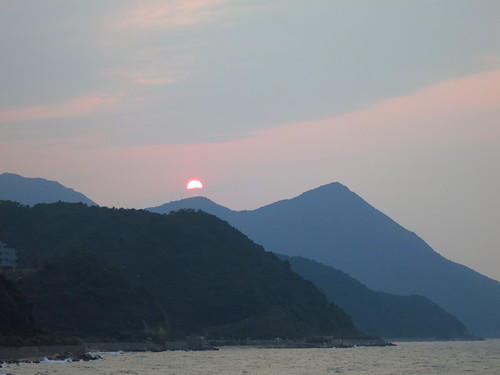
杨梅坑附近海域
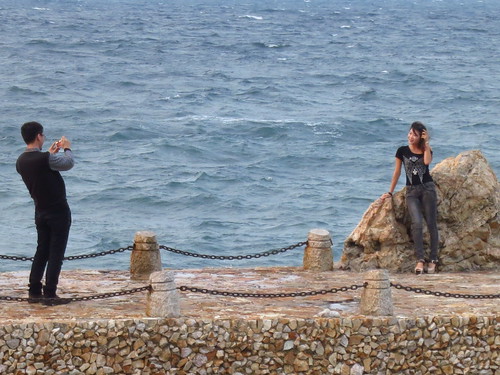
俊男美女
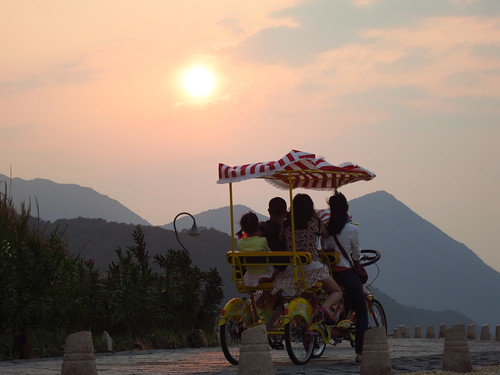
逆光照
在深圳的这些年一直很想了解深港两地的边检变迁。2011年深圳湾公园开放以后去过很多次海边游玩,看到对面的香港,跨海大桥飞架两岸。最近上网搜索到这个文章,对深圳两地的边检的变迁有了更好的认识。
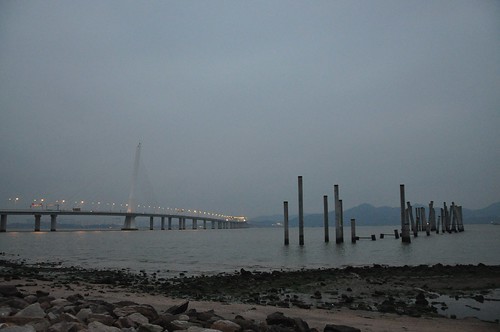
深圳湾公园看跨海大桥和对面的香港
ZT: http://blog.sina.com.cn/s/blog_4b4ba63b0100dyb6.html
自1951年香港和深圳的边界封锁后,偷渡事件天天都有,还曾发生过4次大规模的集体逃港事件,令中央都十分震惊,小平同志都曾亲自参与处理,国内任何新闻单位都严密封锁消息,未曾给予报道,直至现在,深圳电视台才陆陆续续的播出一点解密的当年记录片,看了真是让人有说不清楚的酸甜苦辣。
最先偷渡的是渔民,他们有出海的自由,打到的鱼直接卖到香港,比上交给当年的人民公社,收益相差上百倍,更关键的是他们亲眼看到香港的花花世界之繁荣,卖完鱼后就拿着港币上岸不回家了,人民公社发现这个问题后,立即通知全部的渔船上交由公社保管,未经批准不得出海打鱼,所以直到今天,虽然深圳是个临海城市,但却是全世界渔业最不发达的城市,无论那个村里要是有条船,支部书记非要把它搬到家门口锁住了才放心。
渔民跑了又带动种地的边民,住在深圳河北边的农民累死累活在人民公社一年只赚一百多元钱,很眼馋香港一个月一万多港币的收入,瞅着哨兵不注意的档口,丢下锄头,一窜就蹦到了香港地界,气的哨兵哇哇的干瞪眼,发展到最严重的时候,整个宝安县沿界河的村子,十户九闭,连党员干部都跑光了!地全荒着没人种。
边民跑到香港去很快就发了财,中国人特有的勤奋精神使他们在香港很受好评,他们从最底层做起,经过多年的艰苦奋斗,功成名就,慢慢的融入主流社会,创造了很多财富神话,有人对香港的前一百名富豪统计过,如曾宪梓、黎智英等,竟有四十多名是都是六七十年代非法移民逃过去的人,每逢过年过节,他们都给家乡老人、亲属大把的汇钱过来,有的还介绍怎样逃过边界,怎样在香港找工作等宝贵经验,一下子又带动整个广东省的逃港风潮涌起,1962年开始了第一次大规模的冲关逃港事件,1987年受谣言影响最严重,演变成无法控制的群体性冲关事件,边界上一下子聚集了几十万民众,黑压压的一片,如同“大军压境”,这时已经不叫“偷渡”了,就是明目张胆冲关,他们手持大棒,摆出要拼命的样子,一边吓唬着边防哨兵,一边强行用老虎钳剪开边界铁丝网,扬长而去,战士接到命令不能向民众开枪,部队只得紧急调一个加强团过来抓人,关的深圳和广州的收容所全部爆满。
香港政府看到这么大规模冲关行动,也很是害怕,怕这么多人一天就把香港的存粮都吃光了,下令香港英军也参加拦截,也不向越境的民众开枪,而是玩起了“官兵捉强盗”的游戏,对冲过来的人连拦带抓的直接给遣送回这边,一个批次就能送过来好几千人,送过来的人接着再去参加冲关,反反复复,前赴后继,最终有数万人冲过了中英二国的数道封锁线,成功的到达香港市区,受到香港英政府的“热烈欢迎”。
说“热烈欢迎”不是没有道理的,大陆人的偷渡风潮,起源于香港英政府的政策优待,因为当时是中英对立的”冷战”时期,香港经济又在快速发展,急需大量劳力,因此港英当局从1961年3月就开始实施了新身份证政策,规定:凡成功抵达市区而又具有工作能力的人,只要登记申请,三个月后都发给香港身份证,实际上变相地承认了非法移民的合法化。这个政策对于非法入境者来说无疑就是”大赦令”,香港还偶尔还利用英国女王登基日之类的庆典活动,为非法移民全部转正,这些都助长了逃港风潮愈演愈烈,而且,我们要如实的承认,堵回去的都是老弱病残,能闯过层层封锁线的人都是艺高胆大的精英,香港政府当然心中欢迎,看看现在处处耸立的高楼大厦,栋栋都留下了他们做苦工的汗水。
在深圳偷渡,大致分为走陆路、泅渡和坐船三种,前二种都是不花钱的,走陆路的方式是沿深圳与香港交界的地方想办法跑过去,这里距香港最近,但也是最不容易跨越的,中英二边各拉了一道铁丝网,日日夜夜都有边防部队巡逻,夜间有探照灯,还有令人恐惧的狼狗,所以想从这里偷渡非常困难,只是大规模的人群冲关时才会走这里。泅渡的方式是偷渡者最常用的方式,深圳湾几处地方与香港相距很近,水性好的人可以游泳过去,但你只要敢在这里下水,叛国投敌的罪名当场成立,边防部队是可以开枪警告的,当年偷渡高峰时期红树林海面上就漂着几百具尸体,也说不清楚是中弹死的还是淹死的,一些老人说政府当时组织他们去捞尸埋葬,一天就可以挣到50多元。第三种坐船偷渡是比较安全的方式,但是要花大钱,选择离深圳稍远一点的如惠州等地,夜间开船,只要不被海上巡逻艇堵住,成功率比较高,万一堵住了也不会往死里打,因此一般都是妇女儿童采用这种方式,香港必有她们先跑过去的家人在做接应。
除了想去香港淘金的人外,还有不少在“文革”期间一些饱受迫害的知识分子和知名人士也加入到偷渡行列。著名音乐家、中央音乐学院院长马思聪因饱受凌辱,铤而走险乘船偷渡到香港,然后秘密转道赴美国。陈独秀的女儿是抱着汽油桶从海上漂过去的,香港报纸都在最快时间给予了报道。
临近香港要回归的前些年,香港英政府看到了人口已近饱和,才停止了对非法移民可以发放香港身份证的政策,并决定对查获的非法移民一律遣送,才使得大陆的偷渡风潮立刻平息。
中国政府也为这种逃港风潮伤透了脑筋,为了减轻对中港边界的压力,1982年又决定在深圳市的外边上再设一道防线,这就是众所周知的“二线关”,由武装警察部队看守,规定凡是要进入深圳市的内地人,要凭当地公安局发的“边境管理区通行证”,在深圳主要公路入口都设立有检查站,如107国道上有名的“南头关”,广深高速公路的“同乐关”,最初的时候是逢车必查,有身份证无通行证的可以现场交二元钱快办一个通行证,连身份证都没有的人想进深圳没门!入市无门,但却上山有道,当时就滋生了一个新行业叫“带客仔”,只需给他们50元人民币,强大的二线关就不攻自破,他们有办法把被武警挡住的人都送进深圳去。但有一点我至今没搞明白,坐火车进入深圳的人却从来不查。
今天这道二线关已经形同虚设,面对每天成千上万的过往车辆,武警的小战士只是冷冷的看着,偶尔拦住个别不顺眼的车辆抽查一下,以证明一下关口权威的存在,但已经不再需要通行证,只要有身份证就可以放行,昔日喧闹的联检大厅已经空空洞洞,一排排的验证闸口都贴着“暂停使用”的条子。据说深圳人大已经在呼吁政府取消深圳二线关,因为这种设二道国界的做法在世界上真是太独特了!
香港回归后大陆人逃港事件几乎就没有了,特别是全国开放自由行签证后,大陆人去香港真的是太容易了,2009年深圳市又出了更开放的规定,凡有深圳户口的人,一年中可以无限次的出入香港,没人再去费那个牛劲去偷渡,因此,中港边境一线防线也有了巨大的变化,人们惊喜的看到,边防部队把设在深圳东部和西部边界长达几十公里的铁丝网全部都拆除了,在盐田公路上,香港一侧靠山的一草一木看的清清楚楚,在红树林,没有了铁丝网的海水是那么的碧绿,天空更加湛蓝,这昔日的偷渡圣地现在叫红树林公园,深圳人现在很喜欢站在这海边上,一边放风筝,一边欣赏对面香港的楼景。这巨大的变化,都源于一条政策的变化,现在的中国香港特区政府,不会给任何偷渡人员发放身份证。
还需介绍一下,现在仍有二种特殊的偷渡现象在少量的发生,一种是外国人借道深圳向香港偷渡,大多数是东南亚国家与毒品有关的黑道人物,想把毒品用这种办法运进香港,现在是重点打击的对象。还有一种是从未遇到过的向深圳偷渡,一些稍晚了一点跑出去的人员,碰到了政策改变而无法取得正式身份,在香港处处碰壁混不下去了,偷渡回家,也有一些持有效证件过去非法打黑工的人,其中很多是做小姐的,因长期滞留香港证件过期失效,无法通过海关正当返回,只好选择坐船偷渡进入深圳,对这种现象,边防部队有时也是无可奈何,总不能把自己的同胞再赶回香港去吧,碰巧抓住了教育几天就放她们回家去吧!
深圳的现在繁荣及与香港相比较的低消费,刺激了很多已经在香港成家立业的当年逃港者回来买房及办厂,他们现在的身份是港商,过去的历史已经没人提起,眩耀的是今日的辉煌,金融风暴冲击的深圳楼价刚跌下去一点,今年忽的一下又窜了上来,统计局一查,仅上半年就有近5万套房子被持有香港身份证的人买走了,看来落叶总是要归根的!
Permalink Comments off
在景洪,我们依然住了上次住过的辉煌赌场,ipad上显示的地图表明今天的路程非常长,有1300公里,有一段要绕路到玉溪,我们没有选择那条路,而是下了高速,走盘山路到达石屏,然后上了高速路。
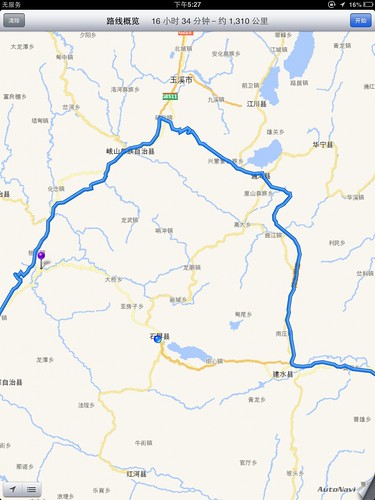
我们没有绕道玉溪,而是盘山路去到石屏,然后上高速
到石屏的这条路先下到一个近2000米的河谷,然后攀升,最后沿着河谷一直开到石屏。路面情况不错,属于山区二级公路,风景非常壮观。70公里的路,我们开了1个半小时。
余下的路没有什么特别的,云南风景秀丽,在这里开车,心情舒畅。临近半夜,到达百色,在这里住了一晚,第二天的傍晚,开车回到了深圳。完成这次老挝,泰北自驾游。
小贴士:
1:老挝,泰国的入境手续很简单,中国驾照,行驶证,护照,签证就可以,签证需要提前在国内办好,如果可能需要办理多次入境老挝的签证,否则就要落地签。
2:据说柬埔寨的车辆入境许可可以在老挝的万象办理(国内办不了)。又据说越南的车辆入境许可也可以办理,还据说马来西亚的车辆入境也很容易,另据说新加坡的车辆入境也很简单,下一次,越南,柬埔寨自驾,泰国,新加坡自驾?
3:我用ipad(3G版,有GPS的那种)导航,头一完缓存下一天的路径,很好用。
4:一般车辆都可以胜任,没必要越野车。
5:老挝,泰国的旅行费用不高,门票便宜,没有过路费,吃的和中国差不多。住稍微便宜一点。
6:订酒店的话,可以上www.agoda.com, 有中文界面。
7:一路上除了过关麻烦一点,其他的基本可使用英文,中文,身体语言搞定,没必要参加自驾车队。
自驾相对于旅行团的好处是自由,如果参加自驾车队,路程都安排好的话,干嘛不上旅游大巴,还省却开车的辛苦。
Permalink Comments off
早上起来,发现院子里全部中国车辆早已走了。今天的路程其实不远,只有500公里左右,包括300多公里的老挝路段。但是要离开泰国,进入老挝,然后离开老挝,进入中国,所以通关手续将浪费很多时间。
老挝和泰国之间的分界线就是湄公河,中国援建的大桥已经修好,不过还没有正式开通,所以只有渡船。泰国的离境手续非常简单,就是:
1:在护照上盖上出境章,
2:交上车辆的入境手续。
都在等轮渡的地方一次完成。
不过这次泰国的边检收了我们一些钱,也没给收据,我认为出境是不需要再交钱的,估计这钱是额外的”小费“,这个口岸过关的主要是中国人,中国人有钱,不计较,不在乎,估计把这些边检给惯坏了。
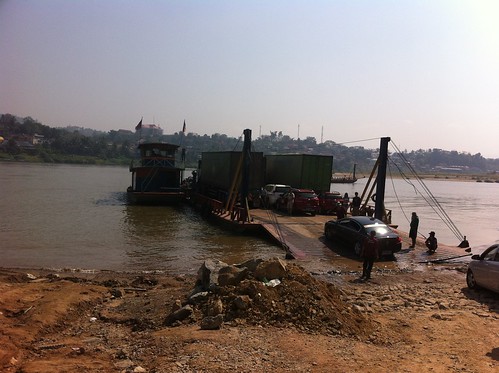
会塞口岸的渡船
办完出境手续,我们排队等渡船,往返的渡船大约2个小时一个往返,渡船是要等全部装满才能走的,所以等待的时间较长。我们上船以后,又在渡船上等了40多分钟。在等候的时候,有人会主动帮你洗车,就是打上湄公河的河水冲一下,没经过你的同意哦,当然你可以拒绝,要是不拒绝,到时候要收20元人民币。
渡船20分钟就到老挝了,开出来就直接进入老挝,没有边境,没有海关,什么也没有。合法的话,需要再办些手续,首先就是车辆的手续,就在渡船到岸的边上,不过他们12点下班,1点上班,手续其实很简单,和中国进入老挝的手续一样,最后会给一张入境证,(记得收了100元,不过中国进入老挝好像只收了80元,总之没有标准,没有收据),然后就是保险,不过我们已经买过保险,保险单还保留着,就没有买。另外入老挝的时候会有人用个水管子冲一下地盘,也要交20元人民币左右。说是免疫费用。
办完车辆手续,需要开1公里左右,在一个很小的巷子里面办理人员入境手续。首先是落地签证,中国人是20美元,没有美元的,可以在旁边的小窗户里换,我们把所有剩余的老挝币和泰铢都换成了美元,交了落地签证的费用。办完签证,就是在护照上盖上入境章,手续就齐了。注意:这些都是在车辆和人员入境以后办理的。不办的话也进入了老挝,不过出去的时候会遇到麻烦。
办完手续,都已经是下午1点多了。渡河,办老挝的手续,前后花费了3个小时。
我们又上路了,沿着昆曼大道开往中国的磨憨口岸,这一段路大约300公里,路面情况很好,据说也是中国援建的,山区二级公路,多急弯,只能开到平均50公里/小时,一路上经过很多老挝的小村庄,这条路上的村庄比去琅勃拉邦那边的村庄要富裕,房子大多数都是砖砌的,而那边多是茅草房。风景很好,我们一路上走走停停,拍拍照,也不是很赶,要注意的是,在昆曼大道唯一的一个交叉路口(一边通往会塞口岸,一边通往琅勃拉邦)那里有一个警察设计好的陷阱,那里不能左转,只能先右转,然后掉头,白天都有警察值班,我们在网上已经看到了公理,到达的时候前面有一个中国车队,领队下车在那里一辆一辆指挥。这条路上基本都是中国的车辆,老挝本地的车很少。
傍晚6点多钟,我们回到了老挝中国边境,马上要回国了,心里很激动哦。别看很多人上网吐槽中国的种种不好,但是要回国了,相比大家心里还是很激动的,毕竟是大家生长和熟悉的地方。
我们发现很多警察,警察把所有的车辆都堵下来了,下车一问,原来老挝副总理要来,所以封路了。还是我们习总好,出行不封路。没有办法只能停车,先走过去办理手续,由于堵下来的车很多,办手续那里很混乱,到了窗口,老挝边境告知只有持有中国护照的人才能通过,持有其他任何证件只能在5:30以前通过。在我们后面的一对夫妻马上就急了,女的是中国人,丈夫是马来西亚人,也就是说丈夫不能离境。这时大家七嘴八舌给出主意,有的说给个“红包”,有的说到中国边境那边询问等。后来他们开车去中国边境询问以后,回来又花了很多时间,才获得了出境章。
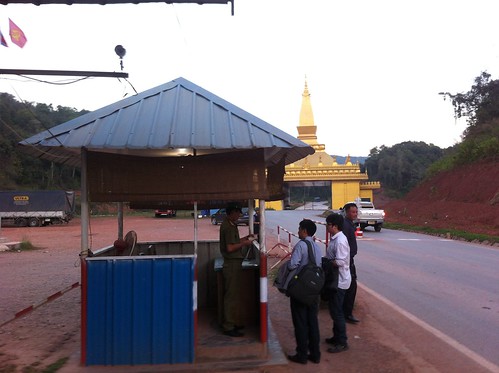
在盖好出境章以后,人员从这里出境,司机开车出境。
等了1个多小时,近8点钟,老挝副总理的车队通过了,我们也就放行了,被堵的车很多,到了中国边检排队很长,我们今天的目的地是景洪,路程不太远,拍在最后,排到我们已经快9点了。大厅里面基本没人了,我们就和杨晓丽(胸牌)警官聊了起来,她说在昆明读的书,以后就在景洪干了10多年,还去深圳实习过,这里虽然压力不太大,环境也好,但是离城市很远,文化娱乐都基本没有,当郭娜警官在我们护照盖上了入境章以后,我们正式回到了国内。她们两开始收拾工作台,下班了。
开车上路,天上是点点的繁星,越来越远的国门,这里有一群边境的警官,默默无闻地工作,虽然我们对这个国家有种种不满,但我对他们还是非常感激的。
到景洪的路很好,车跑起来,快到城市的时候有很多测速拍照,应该被拍好几次,不过归心似箭,管不了那么多。11点左右到达景洪。
Permalink Comments off
早上起来,去了天一方别墅的餐厅吃饭,可以看到山谷两边种上了茶叶,在游泳池边上,我遇到了一位清洁工,他说他小时候随父母才来泰北,父亲是云南保山人,由于当时条件艰苦,自己没读书,所以不认识字,但是可以说中文和泰文。他的普通话有很重的云南口音,现在父母过世了,自己就在这里打工,前几年还回去老家看了看,也没有什么亲人了。
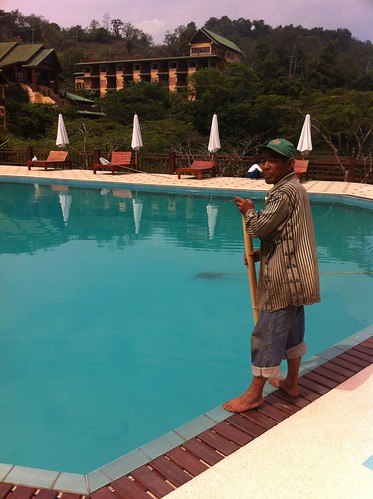
酒店清洁工,云南保山人的后裔
吃饭的时候我们遇到了酒店的老板娘,她也是很小就随父母过来这里,现在子女都已成人,分别在台湾和香港发展,自己在这里买了块地,慢慢发展起来,她说,泰国王妃非常关心他们,给了一些免费的地,用来发展种茶和旅游业,过一段时间也会来视察。可以感觉到,她对泰国还有有感情的,对王妃的感激也是由衷的。
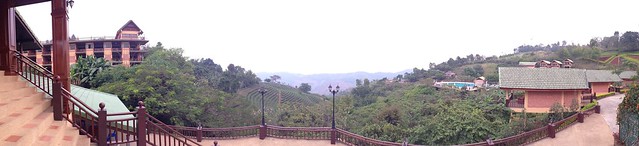
美斯乐天一方别墅的风景
美斯乐很小,主要景点就是段将军墓,泰王佛塔,和泰北义民文史馆。
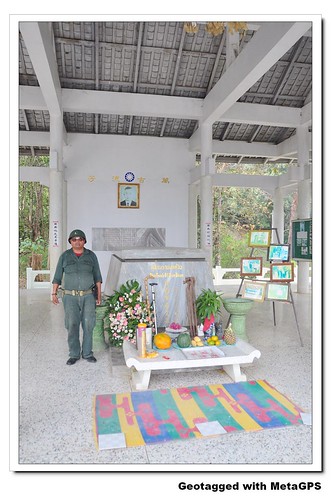
段将军墓和守墓人
段将军墓在美斯乐的一处高地,风水很好,可以俯瞰他为之献身的山谷和他带领的军民的后代。段将军墓并不豪华,甚至有些简陋,里面有一个守墓人,我和他聊起来,他说他的父亲就是段将军的勤务兵,段将军死后,父亲就在这里守墓,父亲过世以后,自己就来守墓,其实守墓是个职业,一般来参观的人都会给一些小费。这几年大陆的游客多起来,小费也多了。他说段将军是个好人,为了军民做了很多好事,所以这个墓是军民自愿捐钱修建的。他说另外一个雷将军就不行了,虽然活了90多岁,一直到前几年才过世,不过把很多捐款都吞为己有,虽然自己有钱建了豪华陵墓,但是在大家心目中地位不高,自然也没人去参观他的陵墓。守墓人还告诉我段将军的后人包括夫人和两个女儿在美国,一个儿子在台湾,一个儿子在香港。
我无法考察他说的话,不过我想,人活到将军这个地位,考虑的事情肯定不是自己发财之类,而且一个人消费不了多少,要那么多财富其实远远没有留下万古英名重要,而帮助他人,特别是自己的手下,在历史上留名,让后人尊敬,可能是高层人士主要考虑的事情。
我留下了小费,对段将军的陵寝默哀以后,去了泰王的佛塔,在另一个山顶上,坡度很大,辉煌气派,也可以俯瞰美斯乐。据说修建这个佛塔的主要意思,是让美斯乐的居民天天能够看到佛祖的影像,而记住自己已经在泰国生活,要信奉佛教,效忠泰王,放弃三民主义。当然信仰和文化是两码事,信仰可以改变,文化就要传播千年了。
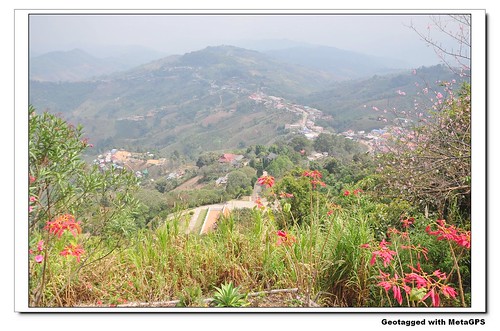
美斯乐全景
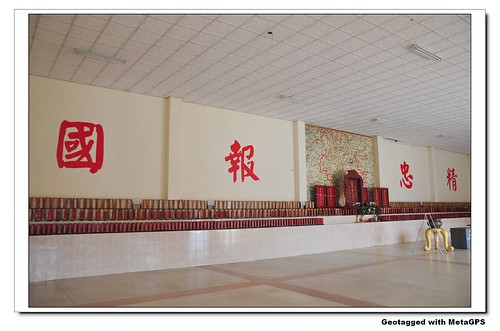
战死将士灵堂
最后一站,我们去了泰北义民文史馆。这里陈列了所有“孤军”战死将士的牌坊,虽然只有一块块小小的木板,但表示他们的奉献,后人没有忘记。让我想起菲利宾克拉克的美军墓地的一排排墓碑。文史馆纪念堂宽敞明亮的殿堂里除了一排排牌坊就是精忠报国四个大字,让人肃然起敬。我们静静地看着孤军历史的介绍,心中充满敬意。作为军人,为国捐躯当然值得尊敬,但是为了自己和战友的生存而死却带上了悲壮的色彩,让人更加尊敬。
看到下面这块雕刻,让我想到了:在这里,有人战死,确与草木同朽,在那边,只要歌功,就能当上将军。而韩战,越战战死将士的灵堂又在那里呢?忘记历史的民族,能走多远?
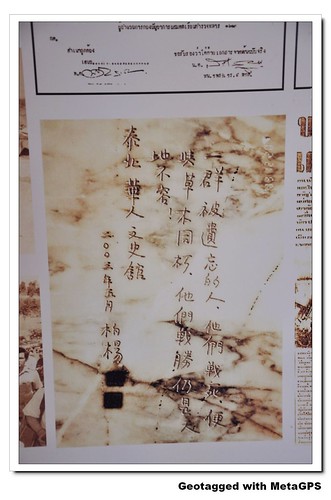
柏杨的评价
中午时分,我们已经看完了美斯乐的主要景点,准备去泰国北部转转,包括缅边境的眉塞,金三角,最后到达泰老边境的会塞口岸。
从美斯乐出来,1个多小时的山路以后就上了高速,高速路一直通到眉塞口岸,这里和缅甸交接,中间只有一条小河分割,桥的两边就是两个国家。自由,富裕的泰国和混乱,贫穷的缅甸。两国的人虽然就相隔一座桥,确有完全不同的命运。
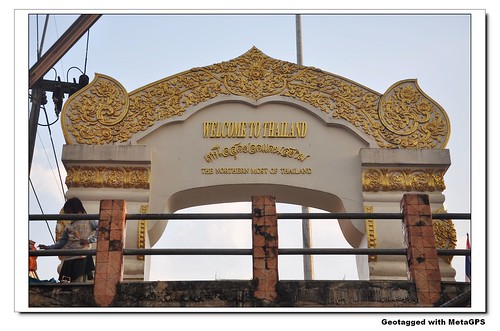
泰国国界
这就是在国界边上拍摄的泰国最北边的国界了。
我们继续开车,去了金三角
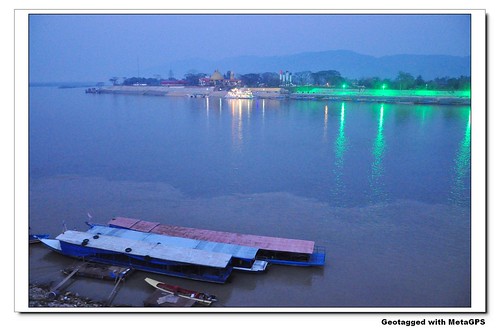
金三角,左边是缅甸,右边是老挝,下面是泰国
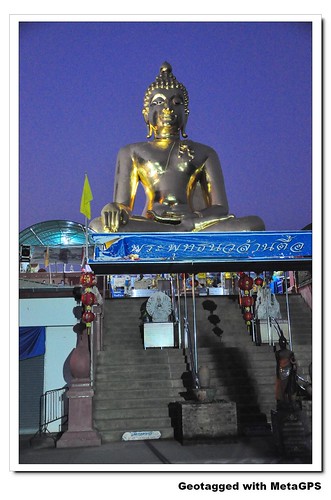
金三角泰国这边的佛像
晚上我们到达了老挝和泰国边境的会塞口岸,入住了这里最好的酒店,(大约300人民币/晚),院子里面停满了中国的车辆,居然又发现了那辆在万象的香昆寺看到的藏A的车。殊途同归,大家明天就都要乐凯泰国,穿过老挝,回到中国了。
Permalink Comments off
美斯乐泰国人称之为(Mae Salong) ,这里的居民是由当年中国大陆解放时,国军第 93 师撤退至此的残部及其眷属与后裔所组成 (当年「异域」一片即以此为背景),因此这里保留了浓厚的「中国」风味,当地学校以普通话 (即我们俗称的「国语」) 授课,居民也以普通话交谈。美斯乐居民以种茶为主,茶园处处,还有数间制茶工厂,颇具规模.
五十多年前,也就是在中国人民解放战争末期,一部分国民党军队从云南败退缅甸边境、流离失所,几经辗转落脚泰北,困居高山密林中。美斯乐就是他们的一个安身处,始于上世纪七十年代。
迄今,原国民党九十三师后裔不断繁衍壮大,已经从当年只有三、四千人飘零到此发展为约十万人寓居世界各地。
美斯乐人不怕说起自己的过去,也不沉沦于往日的辛酸、困苦、血泪中。苦涩的过去,却更加激励他们平凡而顽强地活着,用自己的双手开发、建设起一个美丽的新家园。茅草屋变成了砖瓦房,度假山庄矗立山村里,络绎不绝的游人来了走、走了来。 (百度百科)
中国人到泰北旅游,一般都会去美斯乐看看,主要是想了解那段”充满悲酸的历史“。
今天的路程是从清迈去美斯乐,路程其实不远。我们在清迈城里又逛了一上午,下午才上路去美斯乐。路上有两个景点,一个是一处温泉,很多人在这里卖温泉煮熟的鸡蛋和白庙,白庙还是很壮观的,就在道路边上。
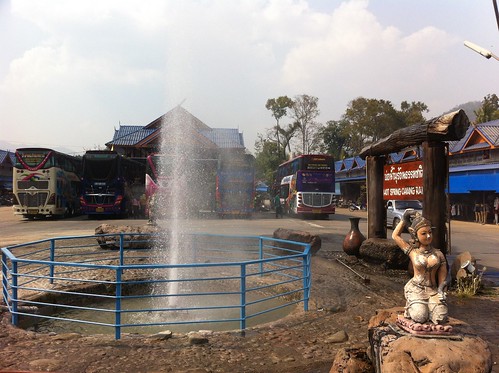
温泉
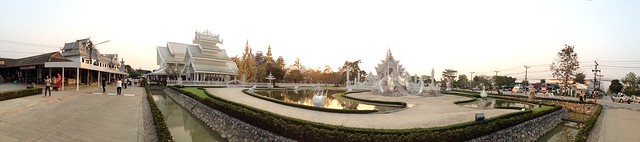
白庙全景
傍晚的时候我们下了高速,开始上山,在交叉路口上,看到了非常亲切的中文标识,表明山里面的居民和中国的关系。在盘山路上饶了近2小时候,我们终于看到路两边的房子多起来了,几乎全部有中文的标识。
到达以后我们先找到的是风雅轩酒店,这个酒店一路上都做了广告,不过房间条件一般,餐厅在二楼,可以观景,环境很好,墙上挂着当年国民党孤军的老照片,本想在这里吃饭,可是老板说厨师8点已经下班,没有饭吃了。我们就在路边找了一家餐厅吃了一顿中餐,餐厅老板是孤军第二代,老板告诉我们他算没有什么资本的人,所以不能去大城市比如清迈或者曼谷发展,只能在这里开个餐厅谋生,好在这几年大陆来的游客多起来,生意才可以维持生活。和老板的交谈中,我感觉到了在泰国北部山区谋生的艰难。
吃完饭,餐厅老板推荐我们去美斯乐最好的天一方别墅。天一方别墅在美斯乐的入口处,招牌非常小,如果不注意,几乎找不到。不过里面确别有洞天,肯定是美斯乐风景最好的酒店。特别是山上那巨大的一片花园,给我留下深刻的印象。天一方别墅的价格不等,便宜一点的在300人民币左右/晚。由于酒店人非常少,我们到达已经快半夜了,而且我们就住一晚上,没有选择观景房。
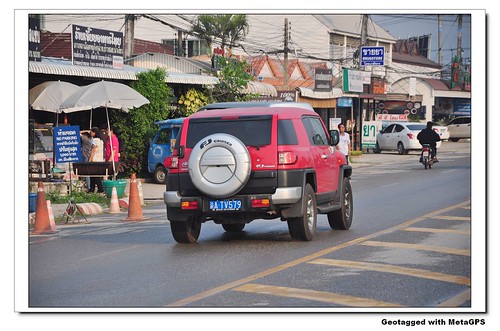
跑在泰国道路上挂中国车牌的车辆
Permalink Comments off
« 上一页 — « Previous entries « 上一页 · 下一页 » Next entries » — 下一页 »